

Learn how to activate your license for new hardware
Recommendations
- Make sure you have a stable internet connection.
- Make sure your firewall allows online communication.
In the case of a network license, the following also applies:
- Make sure that no licenses are borrowed from the Eplan License Manager (ELM Configurator).
- Open the Eplan License Manager Monitor and check whether a license has been borrowed in the column "License borrowed until".
Deactivate online
- You need an Eplan ID and Companyorganisation, please register directly here here.
- After successful registration, navigate to Downloads.
- Select Eplan Rehost, download the software.
- Start the rehost .exe.
- Select the "Revocation" tab, select the "Complet Revoke Online" method.
- Enter the activation code (EID), now use the "Complete Revoke" button to return the activation to Eplan .
- After successful online return, select [Next] and close the dialog.
- You can now activate your EID on a different hardware.
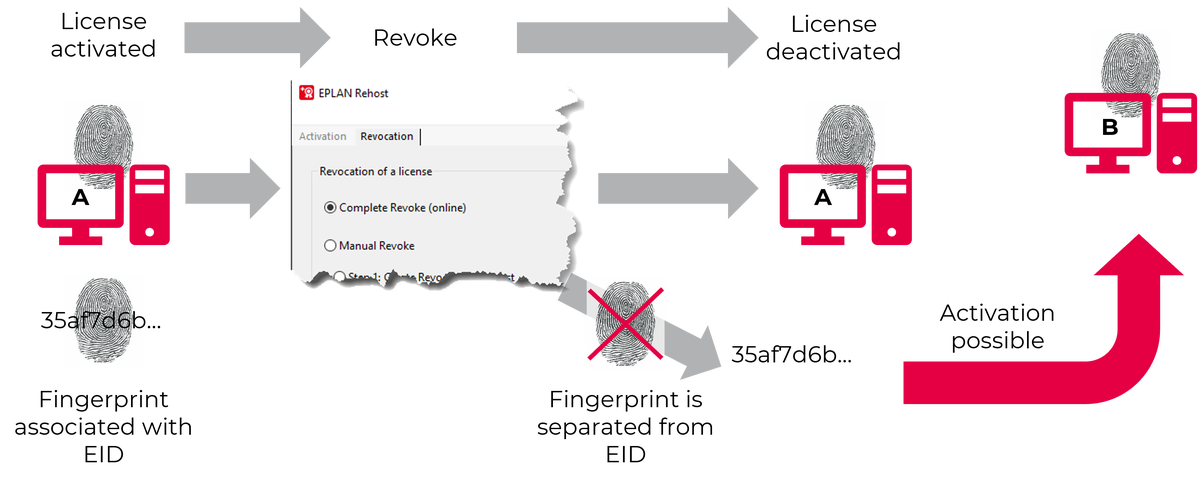 License Revoke

