From Engineering to the Shop Floor: How Eplan Helps Panel Builders Fix the Handoff Problem
From Engineering to the Shop Floor: How Eplan Helps Panel Builders Fix the Handoff Problem1
Why the Engineering Handoff Matters in Panel Building1
Step 1: Start with the Schematic2
Step 2: Create the Digital Twin in Pro Panel3
Step 3: Connect the Digital Twin to Automation4
Step 4: Guide the Build with Smart Production4
Why the Engineering Handoff Matters in Panel Building
Panel builders do not usually lose time because they cannot design a control panel. They lose time because the design does not always transfer cleanly into production.
That handoff between engineering and the shop floor is where many panel building challenges begin. A schematic may be accurate, but production still needs answers: Where does each component go? What is the correct wire length? Which route should each wire follow? Has the latest design change made it to the floor? Can a newer worker complete the job without constant help from a senior technician?
When those answers are unclear, production slows down. Builders spend time interpreting drawings, checking revisions, correcting mistakes, and relying on the experience of a few skilled employees.
That is the problem Eplan helps panel builders solve.
The core idea is simple: Eplan Pro Panel creates the digital twin and Eplan Smart Production turns that digital twin into guided shop-floor execution.
Together, they help panel builders move from “what needs to be built” to “how it should be built” with less guesswork, fewer handoff errors, and more consistent production. When combined with Rittal Automation Systems, that same digital foundation can also support automated machining, wire processing, and a more connected production workflow.
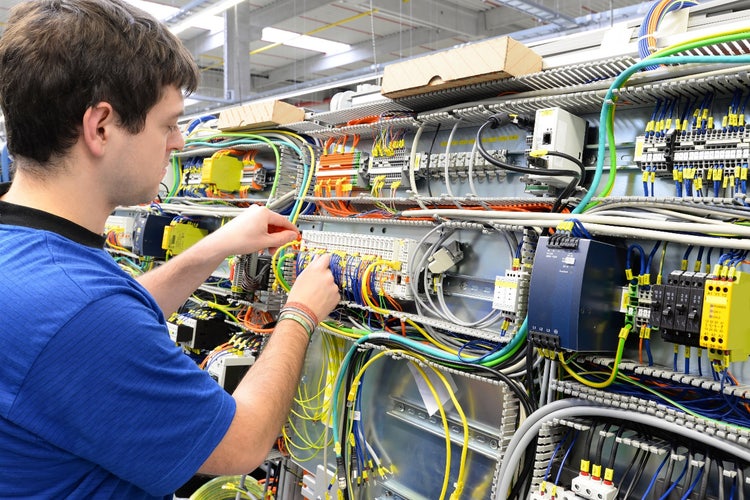
In many panel shops, engineering creates the design and production receives the documentation. Then, the shop floor must translate that information into a physical cabinet.
That translation step creates risks like rework from unclear information; version confusion; inconsistent layouts; unclear wire lengths; time lost searching through documentation; heavy reliance on experienced technicians; slower onboarding; and limited visibility into production status.
For panel builders facing labor shortages, tight deadlines, and increasing complexity, these issues affect throughput, quality, and profitability. A better handoff starts with better data.
Step 1: Start with the Schematic
The process typically begins in Eplan Electric P8, where engineers create schematics that define devices, connections, terminals, and project documentation.
A schematic is the electrical foundation, but it does not always tell production how to build the panel efficiently. It may show what needs to be connected, but not where components should sit, how wires should be routed, what lengths are needed, or where machining is required. That is where Eplan Pro Panel adds value.
Step 2: Create the Digital Twin in Pro Panel
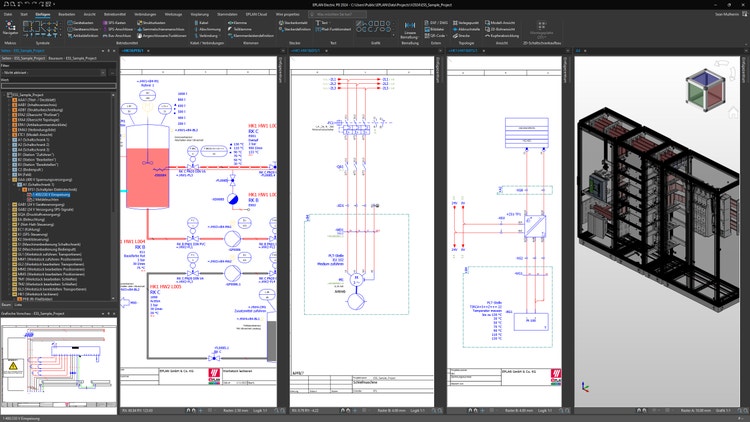
Eplan Pro Panel is a 3D engineering software solution for control panel enclosures, switchgear, and power distribution systems. Its role is to create a detailed digital twin before the cabinet is physically built.
In Pro Panel, engineers can design the cabinet layout in 3D, place components, check spacing and clearances, route wires and cables, define wire lengths and routing paths, plan drilling patterns and cutouts, and generate manufacturing data from the digital model.
The digital twin then becomes the production reference point; instead of asking the shop floor to interpret a schematic and make layout or routing decisions manually, engineering defines that information earlier. It can also support climate control planning through integration with Rittal RiTherm.
Step 3: Connect the Digital Twin to Automation
A stronger handoff also helps make engineering data useful for manufacturing equipment. Rittal Automation Systems can use digital manufacturing data to support automated cutting, drilling, milling, and wire processing. For wiring, the Rittal Wire Terminal WT C10 can process wires by cutting, stripping, crimping, and labeling them based on digital data.
That means the digital twin can support both automated and manual production with the following process: Schematic design → 3D digital twin → manufacturing data → automated processing → guided mounting and wiring

Step 4: Guide the Build with Smart Production
Once the engineering model is ready, Eplan Smart Production brings that information to the shop floor. While Pro Panel supports engineering, Smart Production brings that engineering data to production as a browser-based worker assistance system for mounting and wiring. Instead of asking a worker to interpret a full schematic, Smart Production breaks the build into guided steps with checklists, 3D visual support, and progress tracking.
During mounting, Smart Production shows workers what to install, where it belongs, how it should be positioned, what is complete, and what still needs attention. Barcode scanners can also help identify components and show where they belong.
For wiring, Smart Production presents one connection at a time. For each wire, the worker can see the source connection point, destination connection point, 3D routing path, wire color, wire cross-section, wire length, and completion status. This turns complex wiring into a clearer sequence of manageable tasks and helps newer workers follow the process more confidently, while experienced technicians focus on troubleshooting, quality, and higher-value work.
Better Visibility, Better Feedback
Smart Production helps production managers see what is happening on the floor. Workers can track completed work while managers monitor order progress, processing times, and bottlenecks. When engineering data changes, workers can also be guided through what changed and what needs to be updated, which reduces version confusion. If a worker finds an issue with a component, placement, or wire route, they can send comments or status information back to engineering to improve future builds.
The Big Picture: Design It So It Can Be Built
For panel builders, the question is no longer only, “Can we design this cabinet?” The better question is, “Can we design it in a way that makes it easier, faster, and more reliable to build?”
That is the value of connecting Eplan Electric P8, Eplan Pro Panel, Rittal Automation Systems, and Eplan Smart Production into one digital workflow.
Pro Panel creates the digital twin. Rittal Automation Systems can use manufacturing data from that model to support automated processing. Smart Production brings the digital twin to the shop floor with guided mounting and wiring.
Together, they help panel builders fix the handoff between engineering and production, reduce avoidable rework, and create a more predictable build process.
Want to improve the handoff between engineering and production? Contact Eplan to learn how a connected digital workflow can support your panel building process.