Mastering Requirements: How Eplan Preplanning Keeps Automation Projects on Track

Mastering Requirements: How Eplan Preplanning Keeps Automation Projects on Track1
Scattered, Incomplete Requirements2
Disconnected handover to engineering2
How Eplan Preplanning Tackles These Challenges2
1. Structured Data Capture from Day One2
2. Visual System & Piping Layouts2
3. Automatic Generation of Data Sheets & BOMs3
4. Central, Continuously Updated Repository3
Embedding Preplanning in Engineering Workflows3
Phase 1: Initiation & Requirement Gathering4
Phase 2: Validation & Procurement Prep4
Phase 3: Handoff to Detail Engineering4
This article explores why these challenges persist and how they impact engineering workflows. We will also go into how Eplan Preplanning software provides a structured, integrated solution to streamline requirement management and prepare data for the detailed engineering phase.
Where It Gets Messy
When automation integrators gather system requirements, make updates to specifications, and kick off projects, these challenges often surface:
Scattered, Incomplete Requirements
Information from signal counts to instrumentation data, is often siloed across Excel sheets, emails, and functional diagrams. Missing or outdated data slows progress and introduces risk, especially when project data is not centralized.
Keeping pace with change
Requirements evolve continuously: End-user specifications shift, sensor lists change, or equipment is upgraded. Without a centralized, dynamic capture mechanism, these updates get lost or overlooked.
Disconnected handover to engineering
Once preplanning wraps, the handoff to electrical, fluid, and controls engineering typically involves manual translation of rough requirements collected from the previously mentioned sources. This leads to errors, rework, and documentation inconsistencies.
How Eplan Preplanning Tackles These Challenges
1. Structured Data Capture from Day One
Eplan Preplanning enables structured logging of key components like actuators, sensors, and I/O early in the project. Integrators can import existing Excel-based data into formats tailored for preplanning, ensuring nothing is overlooked.
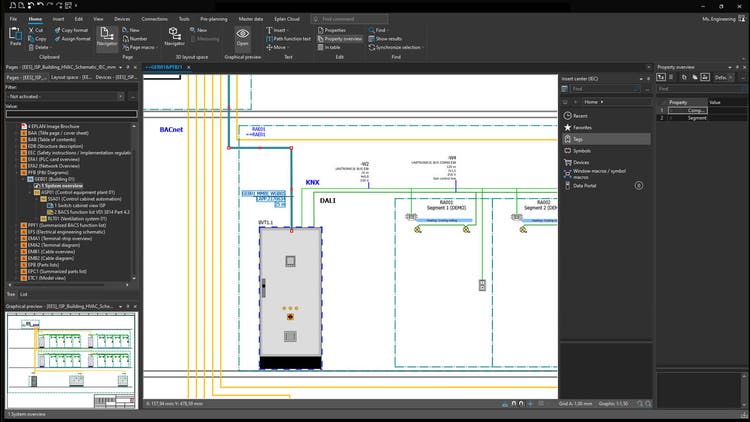
2. Visual System & Piping Layouts
Graphical entry tools support initial plant layouts and P&ID diagrams. This early visualization allows integrators to see the big picture, validate setups with stakeholders, and flag issues before detailed engineering begins.
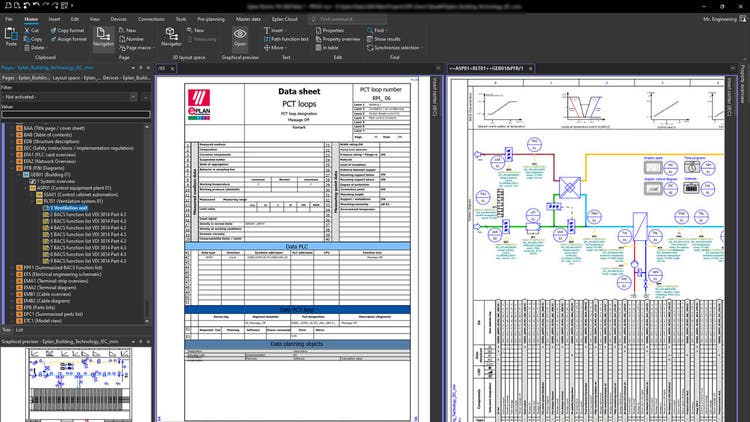
3. Automatic Generation of Data Sheets & BOMs
Once data is captured or imported, Preplanning can instantly generate initial bills of materials and data sheets. This accelerates procurement and helps lock in long-lead components sooner.
4. Central, Continuously Updated Repository
All requirement changes—whether added sensor types, revised signal counts, or added devices—are housed centrally in the Eplan platform. This ensures every team works from the latest version, reducing communications errors.
Embedding Preplanning in Engineering Workflows
Every successful automation project begins with a clear roadmap, and that starts with preplanning the project. This stage isn’t just about listing components; it’s about creating a structured foundation that guides every subsequent step. From capturing initial signals and device data to validating layouts and preparing procurement, preplanning ensures that engineering teams have accurate, actionable information before diving into detailed design. A phased approach like the one provided below can order these steps into a manageable and repeatable process.
Phase 1: Initiation & Requirement Gathering
Import or log initial data: signals, sensors, actuators, piping, wiring.
Sketch system z-levels, piping flows, and instrumentation layouts visually.
Phase 2: Validation & Procurement Prep
Create preliminary data sheets and BOMs to align with procurement schedules.
Share data with stakeholders and adjust system structure as needed.
Phase 3: Handoff to Detail Engineering
Generated data seamlessly transfers to Eplan Electric P8 (electrical), Fluid Power Engineering, or other modules.
The team receives a structured “template” of system segments, devices, signal counts, and visuals, eliminating manual translation errors.
By following a phased approach like the one above, integrators can reduce errors, accelerate workflows, and set the stage for seamless handoff into Eplan’s engineering environment — and Eplan Preplanning can streamline the process further.
Preparing Data for Engineering: Inside Eplan’s Mechanics
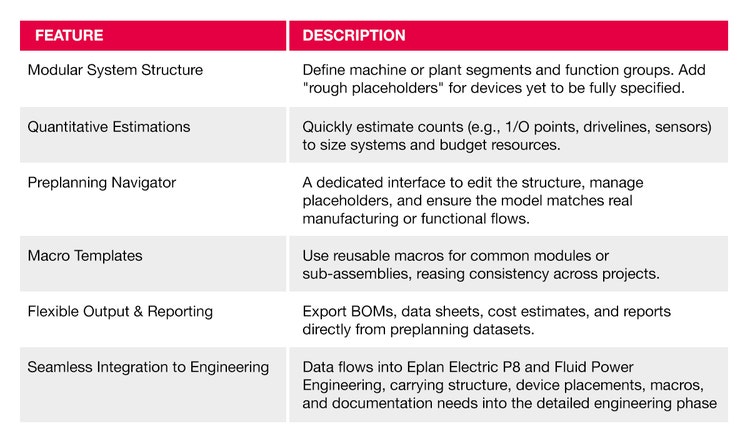
Eplan Preplanning isn’t just a data entry tool. It’s a feature-rich environment designed to bridge the gap between concept and detailed engineering. Each capability within the platform plays a critical role in organizing requirements, visualizing system structures, and ensuring seamless integration downstream. The following table highlights key features and explains how they empower applications engineers to work smarter, reduce errors, and accelerate project timelines.
Why This Matters for Applications Engineers
Improved Scope Management – Preplanning surfaces system needs and constraints upfront, reducing back-and-forth during engineering.
Reduced Rework – A clearly defined, coherent model minimizes mismatches, errors, or forgotten devices later.
Faster Delivery – Structured BOMs and automation reduce manual tasks in engineering, and get procurement launched faster.
Scalable & Consistent – Templates and macros ensure best practices and uniform data across projects.
By enabling early visualization, centralized requirement management, and seamless downstream integration, applications engineers can drive more efficient, accurate, and repeatable engineering outcomes.
Take the Next Step
Want to learn more about how Eplan’s Preplanning can help your processes? Contact us today for a demo!